

Get business pricing on garage and car supplies
- Business-only prices and quantity discounts
- Tax-exempt purchasing
- Multiple users, one account, clear invoices
At a Glance
| Criteria | Professional Automotive Diagnostic Scan Tools | Consumer/DIY Automotive Diagnostic Scan Tools | Winner |
|---|---|---|---|
| Cost | High, typically $500 to over $3000 | Moderate to low, generally $50 to $500 | B |
| Ease of Use | Moderate to difficult, requires training or experience | Very user-friendly, plug-and-play for most users | B |
| Diagnostic Coverage | Extensive, including manufacturer-specific codes, coding, and bi-directional controls | Limited, focusing on generic OBD-II codes and basic data | A |
| Update and Support | Frequent updates, dedicated support, and software subscriptions | Less frequent updates, community support, apps, or basic support included | A |
| Advanced Features | Full suite of features: coding, ECU programming, bi-directional testing | Limited, mostly error code reading and clearing, basic live data | A |
| Compatibility | Wide vehicle and protocol compatibility, often OEM-specific | Mostly OBD-II compliant vehicles, less comprehensive protocols | B |
| Build Quality | Robust, durable, designed for professional use | Lightweight, portable, adequate for casual use | B |
| User Interface | Complex, with steep learning curve but customizable | Simple, intuitive interfaces designed for non-experts | B |
Launch G700 OBD2 Scanner, Car Code Reader with Live Data & I/M Check

<p>The <strong>Launch G700</strong> stands out for its simple, plug-and-play design that requires no apps or batteries, making it accessible for beginners. It covers most 1996+ gasoline and diesel vehicles, offering essential functions like code reading, live data, and emissions checks. Unlike more advanced tools, it focuses on core diagnostics, which means it’s less suited for complex ECU coding or bidirectional testing. Compared with pricier, feature-rich options, the G700 provides excellent value for straightforward diagnostics but is limited to OBD2 compliance and basic vehicle types. It’s a strong choice for home mechanics who want quick results without a learning curve.</p>
Launch G700 OBD2 Scanner, Car Code Reader with Live Data & I/M Check
- ✔ Compatibility: Most 12V gasoline and diesel vehicles 1996+
- ✔ Functions: Read/clear codes, live data, freeze frame, I/M readiness, vehicle info, O2 sensor data, Mode 6 & 8
- ✔ Display: Real-time data and curves

TOPDON ArtiDiag Pro Bidirectional Scan Tool with ECU Coding, 35+ Services
- ✔ Compatibility: VW, A-U-D-I, SKODA, SEAT, BENZ, FCA, Renault, Chrysler, Jeep, Dodge, Fiat
- ✔ Services: 35+
- ✔ Features: Bidirectional control, ECU coding, resets

TOPDON AD600S OBD2 Scanner, Engine ABS SRS Transmission Diagnostic Tool
- ✔ Software Updates: Free lifetime updates via Wi-Fi
- ✔ Systems Diagnosed: Engine, ABS, SRS, Transmission
- ✔ Service Functions: Oil Reset, Brake Reset, BMS Reset, SAS Reset, DPF Regeneration, TPMS Reset, Throttle Relearn, ABS Bleeding, Injector Coding
Pros:
- Easy plug-in design with no app or batteries required
- Supports comprehensive diagnostic functions including live data and emissions readiness
- Quick access to common functions with dedicated buttons
Cons:
- Limited to 12V gasoline and diesel vehicles; no heavy-duty or electric vehicle support
- No full-system diagnostics beyond basic OBD2 functions
- Requires vehicle to be OBD2 compliant, which may exclude some older models
Best for: Beginners and DIYers seeking essential diagnostics with minimal setup
Not ideal for: Professional mechanics needing advanced functions or coverage of heavy-duty vehicles
Bottom line: A straightforward, reliable scanner perfect for quick diagnostics on common vehicles, but not suitable for complex or electric systems.
“A straightforward, reliable scanner perfect for quick diagnostics on common vehicles, but not suitable for complex or electric systems.”
TOPDON ArtiDiag Pro Bidirectional Scan Tool with ECU Coding, 35+ Services
<p>The <strong>TOPDON ArtiDiag Pro</strong> is designed for professional use, offering <em>bidirectional control</em> and extensive ECU coding capabilities. It supports over 35 vehicle services, making it ideal for technicians who need to perform resets, coding, and specific system tests. Compared with basic scanners, it provides much deeper access to vehicle electronics, including European brands like VW, BMW, and Mercedes. However, it requires a thorough vehicle compatibility check beforehand, and the subscription fee after two years can be a barrier for some users. It’s a significant investment but pays off for those who need advanced features and professional-grade performance.</p>
Pros:
- Supports bidirectional control for precise diagnostics and testing
- Covers over 35 vehicle services, including ECU coding and resets
- Compatible with multiple European and American brands, with professional support
Cons:
- Requires confirmation of vehicle compatibility before purchase
- Subscription fee of $249 applies after two years
- No Chrysler 12+8 adapter included due to product upgrade
Best for: Professional mechanics or advanced DIYers needing comprehensive, bidirectional diagnostics
Not ideal for: Casual users or those on a tight budget due to ongoing subscription fees
Bottom line: A top-tier tool for professionals needing deep system access and coding, albeit with ongoing costs and compatibility considerations.
“A top-tier tool for professionals needing deep system access and coding, albeit with ongoing costs and compatibility considerations.”
TOPDON AD600S OBD2 Scanner, Engine ABS SRS Transmission Diagnostic Tool
<p>The <strong>TOPDON AD600S</strong> is a versatile diagnostic device supporting <em>engine, ABS, SRS, and transmission</em> diagnostics across over 90 brands. Its standout feature is the <strong>free lifetime software updates</strong>, ensuring long-term usability without additional costs. The 5-inch touchscreen simplifies navigation, and AutoVIN identification speeds up setup. While it covers a broad range of systems, the accuracy and depth of diagnostics can vary depending on vehicle make and model. It’s an excellent choice for DIYers and small shops that need a comprehensive, user-friendly scanner that’s always up to date, but it’s less suited for those requiring deeply specialized or high-end professional diagnostics.</p>
Pros:
- Free lifetime software updates via Wi-Fi
- Supports diagnostics for engine, ABS, SRS, and transmission systems
- User-friendly 5-inch touchscreen with AutoVIN and live data graphs
Cons:
- Functionality varies by vehicle make and model; some features may not be supported universally
- Requires regular charging to maintain battery life
- Limited to vehicles from 1996 onward, with some advanced features vehicle-dependent
Best for: DIYers, home mechanics, and small shops needing multi-system diagnostics with ongoing updates
Not ideal for: High-end professional use requiring detailed ECU coding or extensive customization
Bottom line: A flexible, multi-system scanner ideal for DIYers and small shops who want ongoing updates and broad coverage without ongoing costs.
“A flexible, multi-system scanner ideal for DIYers and small shops who want ongoing updates and broad coverage without ongoing costs.”
As an Amazon Associate we earn from qualifying purchases.
Key Differences
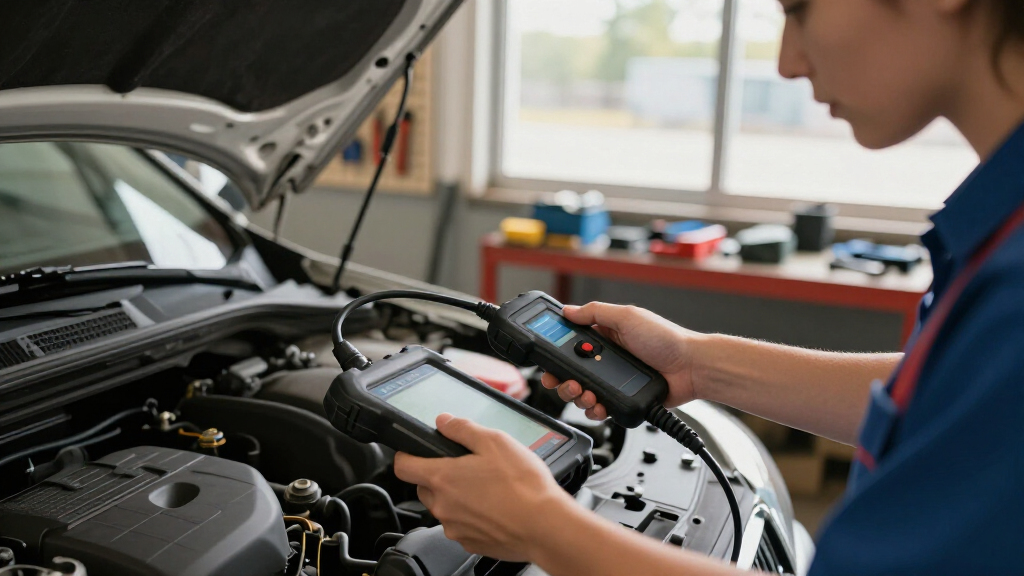
The most prominent difference between professional and consumer automotive diagnostic scan tools lies in their capabilities and target users. Professional tools provide deep diagnostic functions, including manufacturer-specific codes, ECU coding, and bi-directional controls, making them suitable for repair shops and experienced technicians. These tools often require training to operate effectively but deliver comprehensive vehicle insights crucial for complex repairs. In contrast, consumer tools are designed to be accessible for everyday car owners. They focus on basic fault code reading, clearing, and monitoring essential vehicle data, with an emphasis on ease of use and affordability. While they lack the advanced features of professional devices, they are sufficient for routine diagnostics, saving time and money for DIYers and casual users. The choice impacts the scope of diagnostics available and the user’s technical comfort level, with professional tools demanding a higher investment but offering broader capabilities, and consumer tools providing quick, simple insights at a lower cost.Detailed Comparison
Cost (Consumer/DIY Automotive Diagnostic Scan Tools wins — major)
HTML: Professional tools typically cost between $500 and over $3000, reflecting their advanced capabilities and durability. Consumer tools are much more affordable, mostly between $50 and $500, making them accessible for casual users. In practice, the higher expense of professional tools is justified for repair shops or serious enthusiasts who need extensive features, whereas casual users benefit from the low-cost options that cover basic diagnostics.Ease of Use (Consumer/DIY Automotive Diagnostic Scan Tools wins — moderate)
HTML: Consumer tools excel here, with plug-and-play design, simple interfaces, and minimal training required. Professional tools often have complex menus, advanced settings, and a steeper learning curve, requiring technical knowledge. For everyday users, ease of use is critical, making consumer tools preferable. Professionals accept some complexity for more detailed diagnostics.Diagnostic Coverage (Professional Automotive Diagnostic Scan Tools wins — major)
HTML: Professional tools provide comprehensive diagnostics, including manufacturer-specific codes, ECU coding, and bi-directional testing, making them capable of complex troubleshooting. Consumer tools mainly cover generic OBD-II codes, suitable for basic fault detection. The gap is major; for complex repairs, professional tools are necessary, while basic diagnostics can be managed with consumer devices.Update and Support (Professional Automotive Diagnostic Scan Tools wins — moderate)
HTML: Professional tools offer regular updates, dedicated technical support, and sometimes subscription services for ongoing enhancements. Consumer tools have less frequent updates, often community-driven or via basic app updates, with limited direct support. For ongoing diagnostics and vehicle support, professional tools provide more reliability.Advanced Features (Professional Automotive Diagnostic Scan Tools wins — major)
HTML: Features like ECU programming, coding, and bi-directional testing distinguish professional tools, enabling complex repairs and customization. Consumer tools generally lack these capabilities, focusing on error codes and live data. For advanced repair work, professional tools are indispensable; casual users won’t need these features.Compatibility (Professional Automotive Diagnostic Scan Tools wins — moderate)
HTML: Professional devices support a wide range of vehicle makes, models, and protocols, often including OEM-specific features. Consumer tools are typically limited to common OBD-II vehicles, covering most cars sold in recent years but with less protocol depth. For diverse or older vehicles, professional tools are more compatible.Build Quality (Consumer/DIY Automotive Diagnostic Scan Tools wins — minor)
HTML: Professional tools are built for durability, with rugged cases and reliable hardware suited for frequent use. Consumer devices are lighter, portable, and designed for occasional use. Durability matters more in professional settings where equipment is heavily used.User Interface (Consumer/DIY Automotive Diagnostic Scan Tools wins — moderate)
HTML: Consumer devices prioritize simplicity and intuitive interfaces, often with touchscreen displays and guided menus. Professional tools may have complex interfaces with extensive options, requiring training but offering detailed control. For casual use, the simplicity of consumer tools is advantageous.Professional Automotive Diagnostic Scan Tools: Pros and Cons
Pros:
- Comprehensive diagnostics including manufacturer-specific codes
- Advanced features like ECU coding and bi-directional testing
- Regular updates and dedicated support
- Supported across many vehicle types and protocols
Cons:
- High cost, often over $1000
- Steep learning curve requiring technical knowledge
- Bulkier and less portable
Consumer/DIY Automotive Diagnostic Scan Tools: Pros and Cons
Pros:
- Affordable price, often under $500
- Very easy to use with intuitive interfaces
- Lightweight and portable, suitable for casual use
- Adequate for basic diagnostics and routine checks
Cons:
- Limited diagnostic capabilities, mainly generic codes
- Lacks advanced features like ECU coding
- Less frequent updates and support
- Restricted vehicle compatibility for complex diagnostics
Who Should Choose What
Choose Professional Automotive Diagnostic Scan Tools if:
- You are a professional mechanic or repair shop needing detailed diagnostics and ECU programming capabilities
- You work with multiple vehicle brands and require comprehensive coverage
- You are comfortable with a higher investment and technical interfaces
Choose Consumer/DIY Automotive Diagnostic Scan Tools if:
- You are a DIY car owner who wants quick fault codes and basic live data
- You prefer a simple, affordable device for occasional use
- You mainly work on recent vehicles with standard OBD-II systems
Skip both if: You require highly specialized diagnostics beyond typical automotive repair or have no interest in vehicle diagnostics
Value for Money
For most casual users, consumer scan tools offer excellent value, providing essential diagnostic functions at a low cost. They are suitable for routine maintenance, fault code clearing, and monitoring. Professional tools, while expensive, justify their cost through advanced capabilities, ongoing support, and durability, making them a better investment for repair shops or serious enthusiasts who need detailed diagnostics and vehicle programming. Paying more is worthwhile if you require comprehensive features or professional use; otherwise, consumer tools deliver sufficient value for everyday needs.Final Verdict
Choose a consumer diagnostic scan tool if you are a car owner or DIY enthusiast seeking quick, simple diagnostics without extensive features. Opt for a professional-grade tool if your work involves detailed troubleshooting, ECU programming, or supporting multiple vehicle brands, and you’re prepared to invest accordingly. The main deciding factor is whether you need advanced diagnostic capabilities or basic fault detection—select based on your technical needs and budget.Frequently Asked Questions
Can consumer scan tools perform all functions of professional tools?
HTML: No, consumer tools primarily handle basic fault codes, live data, and simple resets. They lack the advanced features like ECU coding, bi-directional testing, and manufacturer-specific diagnostics found in professional devices.Are professional diagnostic tools worth the high cost?
HTML: They are worthwhile for repair professionals or serious enthusiasts needing comprehensive diagnostics, vehicle programming, and support for multiple brands. For casual use, the expense generally exceeds the value gained.Do professional tools require training to operate?
HTML: Yes, most professional-grade tools have complex interfaces and advanced functions that benefit from technical training or experience for effective use.Will a consumer scan tool work on older vehicles?
HTML: Many consumer tools support vehicles from recent years with standard OBD-II protocols. Compatibility with very old or specialized vehicles may be limited, requiring professional tools for full coverage.Fall Picks
fall essentials
As an affiliate, we earn on qualifying purchases.