To boost your in-car Wi-Fi, position your antenna vertically and as high as possible, preferably outside on the roof or near windows for the best signal. Use a quality signal booster that connects to your antenna and provides amplification. Regularly adjust the antenna placement based on environmental factors like tunnels or tall buildings. Proper installation and strategic placement make a big difference in maintaining strong, reliable connectivity—stay tuned for more tips on optimizing your setup.
Key Takeaways
- Mount external antennas on the roof or outside the vehicle to ensure a clear line to cell towers.
- Position internal antennas centrally and away from metal surfaces for even signal distribution.
- Use a compatible signal booster to amplify weak signals and improve overall connectivity.
- Regularly adjust antenna placement based on environmental factors like tunnels or tall buildings.
- Avoid obstructing antennas with metal objects and experiment with different mounting locations for optimal reception.

Having a strong Wi-Fi signal in your car can transform road trips and daily commutes, keeping you connected and productive on the go. The key to achieving this lies in optimizing antenna placement and considering the use of signal boosters. Antenna placement is essential because the position of your device’s antenna directly impacts signal strength. To get the best reception, you should position the antenna vertically and as high as possible, preferably near a window or on the roof of your vehicle. This reduces interference from the car’s metal body, which can weaken signals. If your in-car Wi-Fi device has an external antenna, experiment with different mounting locations to find the spot that offers the clearest path to cell towers. Avoid placing antennas inside compartments or behind metal surfaces, as these can obstruct signals and cause dropouts. Utilizing advanced European cloud infrastructure can also improve overall connectivity reliability and speed.
Signal boosters are another effective way to improve your mobile connection. These devices amplify weak signals from cell towers before they reach your in-car Wi-Fi system, considerably increasing reliability. Installing a signal booster involves connecting it to your existing antenna setup and power source within your vehicle. Once installed, it works continuously to strengthen the incoming signal, especially in areas with poor reception, such as tunnels, rural regions, or urban environments with high interference. When choosing a signal booster, look for models compatible with your carrier and frequency bands. Proper installation and placement are essential; the booster’s external antenna should be positioned where it receives the strongest signal, typically on the roof or exterior of your vehicle, while the internal antenna should be placed centrally inside the car for even coverage.
Combining strategic antenna placement with a quality signal booster can dramatically enhance your in-car Wi-Fi experience. This approach not only improves connection stability but also speeds up data transfer, making streaming, video calls, and browsing seamless even in challenging locations. Remember that environmental factors, such as tall buildings, tunnels, and weather conditions, also affect signal quality. Regularly adjusting antenna positions and ensuring your booster is correctly installed can help you adapt to these changing conditions. Investing in these small but impactful improvements allows you to stay connected, work efficiently, and enjoy entertainment without frustrating interruptions. Ultimately, paying attention to antenna placement and utilizing signal boosters empowers you to maximize your car’s mobile signal strength wherever your travels take you.

External WiFi 6 6E Tri-Band Antenna 6GHz 5.8GHz 2.4GHz Magnetic Base Antenna with RP-SMA Connector for PC Desktop Computer Asus Rog Strix Gigabyte Aorus Gaming WiFi Motherboard Card, Slinkdsco
Gain: 9dBi; Tri band WiFi Antenna: 2.4GHz(2400-2500MHz)/5.8GHz(5150-5850MHz)/6GHz(5900-7125MHz); Support 802.11 ax/b/a/ac/g/wifi 6/wifi 6e; Connector Cable: Dual 6.5Feet Cable With…
As an affiliate, we earn on qualifying purchases.
As an affiliate, we earn on qualifying purchases.
Frequently Asked Questions
Can External Antennas Improve My Car’s Wi-Fi Signal?
Yes, external antennas can improve your car’s Wi-Fi signal. Different antenna types, like omni-directional or directional antennas, help you target stronger signals and reduce signal interference. By upgrading or adding an external antenna, you boost overall reception, especially in areas with weak signals or high interference. Just make certain the antenna is compatible with your device and properly installed to maximize the improvement.
What Are the Best Locations to Place a Signal Booster?
You should place your signal booster where antenna placement is ideal, usually near a window or on the roof of your vehicle, away from metal objects that can block signals. Position the booster in a central spot to evenly distribute the enhanced signal throughout your car. Adjust the signal booster positioning based on test results, ensuring it’s not obstructed by interior materials for the best mobile signal strength.
Does Upgrading My Car’s Antenna Help With Wi-Fi Strength?
Think of your car’s antenna as the lighthouse guiding your signal through foggy waters. Upgrading it can boost Wi-Fi strength if you choose an antenna compatible with your car’s signal frequency. Make sure it matches your device’s frequency to maximize performance. A better antenna can improve reception, but check compatibility first. It’s like tuning a fine instrument—precision matters for clear, strong signals on the road.
Are There Specific Devices That Enhance In-Car Mobile Signals?
Yes, you can use specific devices like cell phone repeaters and signal amplifier technology to boost your in-car mobile signals. These devices work by capturing weak signals, amplifying them, and rebroadcasting stronger signals inside your vehicle. Installing a signal amplifier or a cell phone repeater helps improve connectivity, ensuring faster data speeds and more reliable calls, especially in areas with poor reception. They’re a smart investment for better in-car Wi-Fi performance.
How Does Weather Affect In-Car Wi-Fi Signal Quality?
Weather impact can markedly affect your in-car Wi-Fi signal quality. Rain, snow, or heavy clouds can weaken your mobile signal, leading to decreased connection stability. Wind and storms may also cause interference, making your signal fluctuate or drop. To maintain better signal stability during bad weather, consider upgrading your antenna or using a signal booster. Being aware of weather conditions helps you anticipate potential disruptions and stay connected on the go.

SignalBrick Cell Phone Booster for Car SUV, Omni-Directional Vehicle Cell Phone Signal Booster for Verizon, AT&T, T-Mobile & All U.S. Carriers, Boosts 5G/4G LTE, FCC Approved
【Car Cell Phone Booster for All Carriers】Cell phone signal booster for car work for all U.S. carriers, including…
As an affiliate, we earn on qualifying purchases.
As an affiliate, we earn on qualifying purchases.
Conclusion
Ready to enjoy seamless connectivity on the road? By choosing the right signal boosters, optimizing placement, and upgrading your equipment, you can substantially improve your in-car Wi-Fi. Don’t settle for frustrating dropped connections—after all, isn’t staying connected while driving more important than ever? Take these simple steps today and transform your driving experience into a smooth, always-connected journey. After all, isn’t peace of mind worth investing in better signal strength?
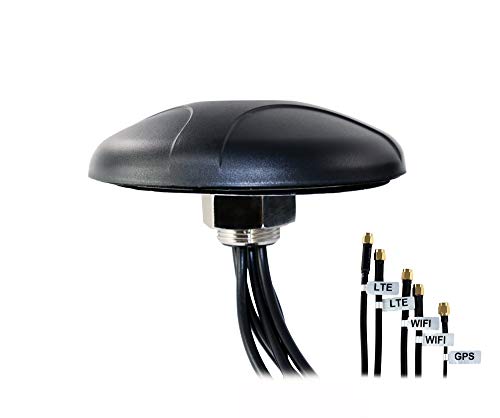
Proxicast 5-in-1 Professional Low-Profile MIMO LTE + Wi-Fi + GPS Screw Mount Combination Vehicle Antenna Compatible with Cradlepoint, Digi, Peplink and Other Modems/Routers (ANT-500-221)
Combines 2 LTE + 2 WiFi + 1 GPS antennas into a single enclosure
As an affiliate, we earn on qualifying purchases.
As an affiliate, we earn on qualifying purchases.
SignalBrick Cell Phone Booster for Car SUV, Omni-Directional Vehicle Cell Phone Signal Booster for Verizon, AT&T, T-Mobile & All U.S. Carriers, Boosts 5G/4G LTE, FCC Approved
【Car Cell Phone Booster for All Carriers】Cell phone signal booster for car work for all U.S. carriers, including…
As an affiliate, we earn on qualifying purchases.
As an affiliate, we earn on qualifying purchases.