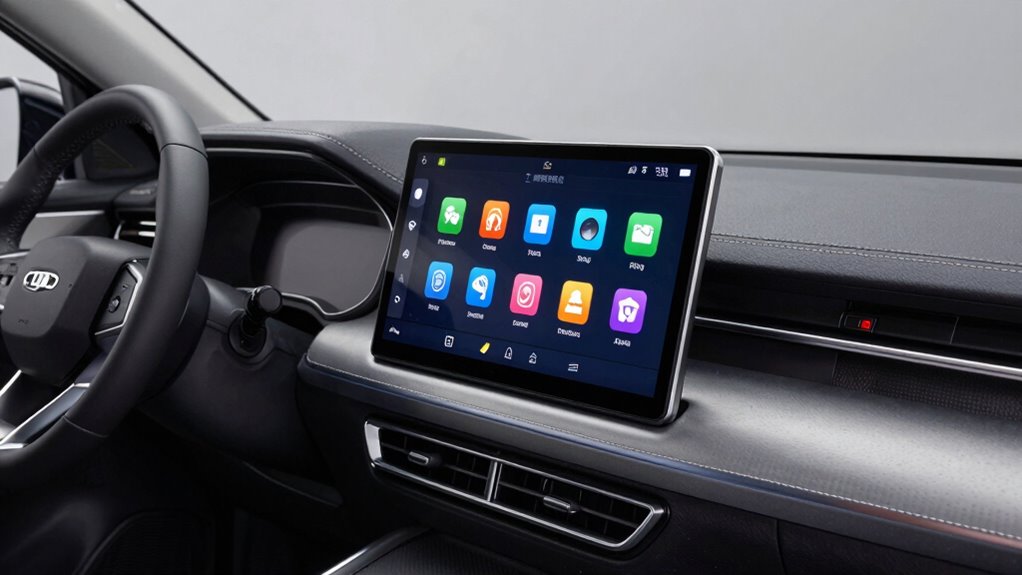
To determine if your car can support a touchscreen upgrade, start by checking your vehicle’s wiring harnesses and consulting your manual or a professional. Measure your dashboard space to make certain your chosen screen fits and see if it connects with your existing systems like audio and navigation. You also need to verify your electrical system’s capacity and be aware of manufacturer restrictions that could affect warranties. Keep exploring—there’s more to uncover for a smooth upgrade.
Key Takeaways
- Check your vehicle’s wiring harness and consult manuals or professionals to ensure compatibility with the touchscreen’s wiring requirements.
- Measure dashboard space and verify mounting options to ensure the touchscreen fits your vehicle’s layout.
- Confirm that the touchscreen integrates seamlessly with existing audio, navigation, and Bluetooth systems.
- Assess your vehicle’s electrical capacity to support the additional power demands of the upgrade.
- Review manufacturer guidelines to avoid warranty voids and ensure the upgrade complies with vehicle restrictions.

If you’re considering upgrading your car with a touchscreen, the first step is to determine whether your vehicle can handle the installation. This involves a few essential checks, especially related to vehicle wiring and compatibility. Your car’s existing wiring system plays a significant role in whether you can seamlessly integrate a modern touchscreen. Some vehicles have advanced wiring setups that support aftermarket upgrades, while others might lack the necessary connections. To assess this, you’ll need to examine your vehicle’s wiring harnesses and see if they can connect to the new unit without extensive modifications. If you’re unsure, consulting your vehicle’s manual or a professional installer can clarify whether the wiring is compatible or if additional adapters are needed. Additionally, understanding the role of wiring compatibility can help you determine if your vehicle’s electrical system is suitable for a new touchscreen. Compatibility checks are equally important. Not all touchscreens fit every car model, so you’ll want to verify that the size, mounting options, and interface align with your vehicle’s dashboard. Some vehicles have unique dashboard layouts that require specific mounting kits or custom trims. Checking for dashboard layout compatibility can save you time and prevent potential installation issues. Also, ensure that the touchscreen you choose can connect with your car’s existing audio, navigation, and Bluetooth systems. Some modern vehicles might have proprietary systems that could conflict with aftermarket units, so researching or asking questions about compatibility guarantees a smoother upgrade. Moreover, understanding electrical system requirements can further ensure that your vehicle can support the additional power needs of a new touchscreen. It’s also helpful to be aware of any manufacturer restrictions that might affect your ability to upgrade your system without voiding warranties.

SYNC 2 to SYNC 3 Upgrade Kit for 2011-2018 Ford F150 F250 Lincoln Etc with 8" Touchscreen Diplay SYNC 3.4 APIM 4G+32G GPS Navigation NA224 Carplay & Android Auto (with Wireless CarPlay Adapter)
- Compatibility: Fits Ford and Lincoln vehicles
- VIN Pre-Programming: Free data matching with VIN
- Easy Installation: Simple setup without dealer visit
As an affiliate, we earn on qualifying purchases.
As an affiliate, we earn on qualifying purchases.
Frequently Asked Questions
Can I Upgrade My Car’s Touchscreen Without Professional Help?
You can attempt a DIY installation if you’re comfortable with car electronics and follow detailed guides. Check your car’s compatibility first, and consider firmware updates to guarantee the new touchscreen works smoothly. However, if you’re unsure or uncomfortable with technical tasks, it’s safer to seek professional help. Proper installation is key to avoiding damage, so weigh your skills carefully before proceeding with a DIY upgrade.
Will a Touchscreen Upgrade Affect My Car’s Warranty?
A touchscreen upgrade can affect your car’s warranty, especially if it violates manufacturer restrictions. Warranty implications depend on whether the installation causes damage or malfunctions, which manufacturers might view as voiding your coverage. To avoid issues, check your vehicle’s warranty terms and consult your dealer beforehand. If you’re cautious and follow the manufacturer’s guidelines, you can minimize the risk of losing warranty protection during your upgrade.
How Long Does a Typical Touchscreen Upgrade Take?
Time is of the essence, and your installation process typically takes 2 to 4 hours. You’ll need basic tool requirements like screwdrivers, a pry tool, and possibly a wiring kit. The duration depends on your car’s make and model, as well as your familiarity with the process. Rushing through might compromise safety, so it’s best to allocate ample time and carefully follow instructions for a smooth upgrade.
Are There Any Compatibility Issues With Aftermarket Touchscreens?
Compatibility concerns often arise with aftermarket integration, so you need to verify your vehicle’s specifications first. Some aftermarket touchscreens may not seamlessly fit or connect with your car’s existing wiring and systems, leading to potential issues like poor functionality or audio disruptions. Always check compatibility details before purchasing, and consider consulting a professional to guarantee the upgrade integrates smoothly without causing electrical or software conflicts.
What Is the Estimated Cost of Upgrading to a Modern Touchscreen?
The cost estimation for upgrading to a modern touchscreen varies widely based on your car’s make, model, and the features you want. Generally, upgrade expenses range from $300 to over $1,500, including parts and installation. You’ll need to take into account the touchscreen’s compatibility, quality, and additional accessories. To get an accurate estimate, research specific models and consult professionals, ensuring you budget appropriately for a seamless upgrade.

Scosche GM2K-WP Factory Stereo Replacement Interface Adapter, Compatible with Select 2000-13 GM Vehicles, Car Radio Wiring Harness, Retains Steering Wheel Controls & OEM Amplifier – See Fit Guide
- Seamless Factory Radio Connection: Connects aftermarket stereo to factory harness
- Retains Steering Wheel Controls: Keep steering controls and warning chimes
- Improves Audio Performance: Stable data output for better sound quality
As an affiliate, we earn on qualifying purchases.
As an affiliate, we earn on qualifying purchases.
Conclusion
Upgrading to a touchscreen can modernize your car’s interior, but it’s not just about the sleek display. Think of it as giving your car a new heartbeat—smooth, responsive, and connected. If your vehicle’s wiring and space can handle the tech, you’ll enjoy the convenience and style it brings. But if not, that shiny screen might just be a pretty façade. Embrace the upgrade if your car’s ready, or cherish the classic charm if it’s not.
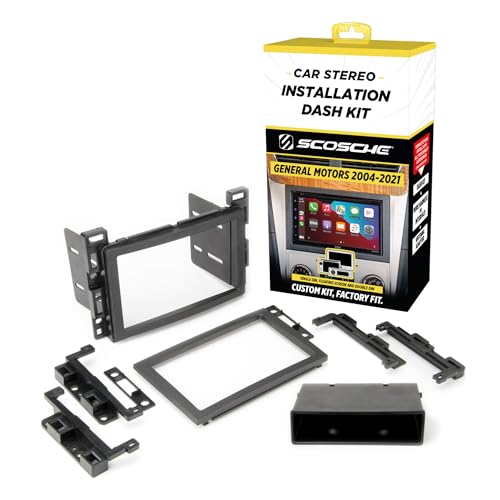
Scosche GM2500B Double DIN or Single DIN with Pocket Radio Installation Dash Kit Compatible with Select 2004-2021 GM Vehicles – Car Stereo Install Kit – See Fit Guide in Images to Verify Your Vehicle
- Perfect Fit for Select Vehicles: Designed for 2004-2021 GM models
- Sleek Interior Design: Provides a factory-installed look
- Easy to Install: Includes hardware and step-by-step instructions
As an affiliate, we earn on qualifying purchases.
As an affiliate, we earn on qualifying purchases.

Metra Axxess Integrate Navigation Output Interface for Fiat 500 2012-2015, Black, AXDI-6515
- Vehicle Compatibility: Fits Fiat 500 2012-2015 models
- Navigation Output: Supports ACC and navigation output
- Complete Wiring Solution: Includes connectors, RCA, and auxiliary input
As an affiliate, we earn on qualifying purchases.
As an affiliate, we earn on qualifying purchases.